Ruth Catherine Dunn DAY (1916- 1971), wife
of IRA REESE DAY

Born:
January 23, 1916 in Paterson, NJ.
Died:
November 10, 1971, South Paterson, NJ.
Father:
John Francis Dunn (1887-1955)
Mother:
Sarah Craig (1887-1970)
[DUNNs
and CRAIGs - ]Ruth
worked the first commercially successful key-driven mechanical
calculators made in the United States back in 1887 called a
comptometer. She was so good at it she was in demand at banks. Ruth
and Ira had five children. In 1968 Ruth and Ira took in Bill and
Stella De Stefano's two daughters, JoAnn born about 1952 and Sandra
born about 1954, after their mother died. Their father had died a
year or two earlier.
World
War II my mother set up offices for Curtis-Wrights Industries who
made plane and other equipment for the military and where my father
worked for all his life though the two did not date until meeting at
a Holy Name parade. My father was a member of The Holy Name Society
and my mother a parade goer. At their wedding my mother wore a
business suit. One of her closest sisters, Aunt (Frances) Babe and
Uncle Marty, my father’s best friend whom he introduce to Ruth’s
sister, stood in for them. It was during WWll, and her mother was
against her marrying my father. So they eloped to New York City. No
other family members were present. My father rescued my mother from
her horrible mother.
My
aunts told me Years after my mother's death about how my mother was
always kind, quiet, pleasant, smart, religious and always nervous.
She like roller skating. She went to Saint John’s Grammar school
in Paterson and then business school and became a comptometer
operator.  |
Ruth-1936 Garret
Mountain overlook Paterson |
She also had a
hard life living with her mother who beat her. Their mother did not
beat her other children but chose to always pick on Ruth. Ruth was
her mother’s ‘whipping boy.’ The other children never
intervened because they were afraid their mother would turn on them.
Their father gave my mother beer to get her through hard times. She
was still living with her parents when she met my father and eloped
to married him.
I
would sometimes watched the Million Dollar Movies with her
afternoons. And my sister, Doris, liked to chat with her over tea
some sometimes. They would make a pot on tea and serve in on the good
china.
In
the mid-1960s, my mother, Ruth, saved a toddler when our family was a
Lake Rick-A-Bear Lake, in Kinnelon New Jersey. She came along the
path of trees that ran beside the lake just past the picnic tables
she saw the child in the water apparently having fallen off the
bank. No one else was close by. She waded into the water and grabbed
the child. I came along shortly after and one of the beach goers
rushed up to me and said, “your mother saved that baby from
drowning.”
I
didn’t say a thing while looking to the side. Back at my family's
picnic table my dad was grilling burgers and chicken wings the rest
of the family sitting at the table. I said to my mother, “someone
said you saved a baby?” Mom just continued to smile and gave me a
shrugged. That was her.
I
took French my first year in high school. The first day of class the
teacher, Mrs. Chackmanoff called my name and as me to stand she told
the class that she was honored to be teaching me because it was my
mother who taught her English. When I told my mother, this and ask
about it she told me my teacher had being in a camp in the WWII when
the Germans held France and that a Russian Prince had saved her from
the camp and death. They had come to America and lived upstairs from
my family on Madison Avenue, Paterson, NJ. Mrs. Chackmanoff did not
speech English. Not long after Mrs. Chackmanoff and her family moved
in, my mother went to the grocery store around the corner on Market
Street. Mrs. Chackmanoff was there and was looking at the money she
had in her hand and crying. My mother looked at the items she was
buying and at her money and showed her how much was needed to pay for
them. Then my mother took her home and began to teach my French
teacher the English language. My mother told this to me with a air of
not having done anything special. But I think it was.
I
didn't do well in french and after exams, Mrs. Chackmanoff called me
to her desk and quietly said I should not take french II, but she was
passing me because of my mother. She added, and because she changed
my drapers when I was a baby. |
Fran (called Babe-first on left), Ruth, Alice and James Brennan, with hat on. One of the other kids would be his brother Francis S. Brennan.
|
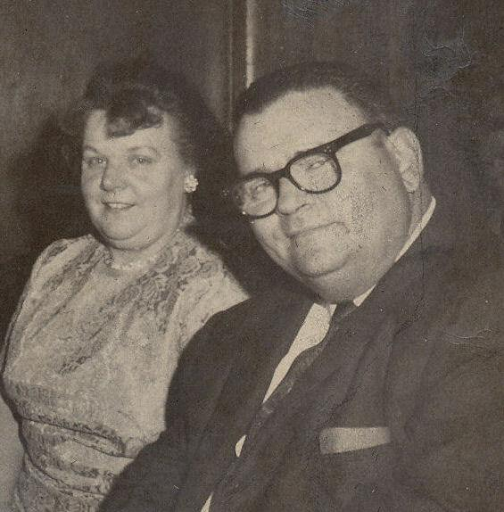 |
Ruth and Ira 1967, daughter Lorriane's engagement |
Source
Date:1920:
https://familysearch.org/ark:/61903/1:1:M4YW-GTB
Where
The Record Is Found (Citation) "United
States, Census, 1920", , FamilySearch
(https://www.familysearch.org/ark:/61903/1:1:M4YW-GTP
: Wed Jan 15 11:00:50 UTC 2025), Entry for John Dunn and Sadie Dunn,
1920. Name: Ruth Dunn, Female, Age-4. Birth Year(Estimated) • 1916 Birthplace: New Jersey. Household Identifier: 121. Line Number: 41. Sheet Letter: •A. Sheet Number• 5. Affiliate Publication Number•T625. Affiliate Name• The U.S. National Archives and Records Administration (NARA). Ruth Dunn's: Parents and Siblings: Sadie Dunn, Mother, F, 32, New Jersey. John Dunn, Father, M, 33, New Jersey. Sadie Dunn, Sister, F, 5, New Jersey. Francis Dunn, Sister, F, 3, New Jersey. Anna Dunn Sister F, 12, New Jersey. Alice Dunn, Sister, F, 10, New Jersey.
View
Original Document
Ruth Dunn United States, Census,
1940. Attached
To: Ruth C Day Female 1916–1971 • LRSZ-WCB Marriage:
Citation information. Name: Ira Day: Gender; Male. Marriage Date:
1944. Marriage Place: New Jersey, USA. Spouse:
Ruth Catherine Dunn. New Jersey State Archives; Trenton, New Jersey;
Marriage Indexes; Index Type: Bride; Year Range: 1944; Title: New
Jersey, Marriage Index, 1901-1914. Publisher: Ancestry.com
Operations, Inc. Publisher date: 2016. Publisher location: Lehi, UT,
USA. New Jersey, Marriage Index, 1901-1914.
"United
States 1950 Census",
FamilySearch ([https://www.familysearch.org/ark:/61903/1:1:6F9Y-VVVZ] Ira
Day: Industry: lithograph manager. Census •
United States, Census, 1950.
Name: Ira Day. Age: 20 years. Birth Year (Estimated) 1930.
Birthplace: New Jersey. Marital Status: Married. Race: White.
Relationship to Head of Household: Head. Event Date 10 April 1950.
Event Place Paterson, Passaic, New Jersey, United States. Event Place
(Original) Paterson, Passaic, New Jersey. Enumeration District:
32-155. Line Number, 27. Page Number, 16. Ira Day's Spouses and
Children: Doris Day, 1 years. Ruth Day, Wife, 33 years. Lorraine Day,
3 years.
~
Ruth Catherine Dunn
BIRTH: 23 Jan 1916. Paterson, Passaic
County, New Jersey, USA. DEATH : 10 Nov 1971 (aged 55) Paterson,
Passaic County, New Jersey, USA.BURIAL:
Calvary Cemetery and Mausoleum Paterson, Passaic County, New Jersey,
USA. MEMORIAL ID 242055903 · View
Source
Spouse: Ira Reese Day 1921
– 1970.
Children:
Doris Ann Day 1949
– 2017.
Ira
R "Ike" Day Jr 1953
– 1989. https://www.findagrave.com/memorial/130014351/ira-r-day
Find
a Grave , database and images (
https://www.findagrave.com/memorial/242055903/ruth_catherine-dunn
: accessed May 20, 2024 ), memorial page for Ruth Catherine Dunn (23
Jan 1916–10 Nov 1971), Find a Grave Memorial ID 242055903
, citing Calvary Cemetery and Mausoleum, Paterson, Passaic County,
New Jersey, USA; Maintained by J. Day (contributor 51253809
).
~
Ira
and Ruth’s Children:
1>
L R Maher was born on 8 Oct 1946 in Paterson, NJ.
 |
LR Day and Bill Maher- Engagement 1967
|
LR married William
Maher -(divorced), son of
William Bulger Maher
and Dorothy Merriman Maher
on 7 Oct 1967 in St. George's Church, South Paterson, NJ. They
had 2 children: M Maher and K Maher. The
marriage ended in divorce. William was born about 1945 in New York,
USA and died on 14 Dec 2015 in New York, about age 70, and was buried
in Flushing, Queens County, New York, United States of America. They had two children.
[MAHERs
and Merrimans - ]
 |
| Ira R Day 1951 and his 2 daugthers LR -5 and Doris- 2and a half |
 |
LR with her Parents:
Ruth and Ira R Day |
William
J Maher
BIRTH:
c. 1945 DEATH: Dec 2015 BURIAL: Mount Saint Mary Cemetery
Flushing , Queens County , New York , USA Show
Map GPS-Latitude:
40.740963, Longitude: -73.7994766 PLOT Section: 016, Row: F, Grave:
131. MEMORIAL ID: 176791061 ·
Source
https://www.findagrave.com/memorial/176791061/william-j-maher
source:
Find a Grave , database and images
( https://www.findagrave.com/memorial/176791061/william-j-maher :
accessed 20 December 2023 ), memorial page for William J Maher
(unknown–14 Dec 2015), Find a Grave Memorial ID 176791061 ,
citing Mount Saint Mary Cemetery, Flushing, Queens County, New York,
USA; Maintained by Not Forgotten - Wis. (contributor 48187279 ).
2> Doris Ann DAYwas
born on 9 Jan 1949 in Paterson, NJ, USA and died on 26 Nov 2017 in
Hackensack, Bergen, New Jersey, USA, at age 68. Doris married Brian
Winterberg (c.
1950-2024),
son of William C. Winterberg
and Helen
REFI (c. 1930- )on
Apr 1969. The marriage ended
in divorce in th 1980s.
Brian was born about 1950 in Paterson, Passaic, New Jersey, USA. They
had one daughter Christine.
[WINTERBERG- RIFI - ]
 |
| Doris Ann DAY about 1968 |
When Doris
was 11, my mother got a phone call for a kid who had got to school
with my older sister. She couldn't understand what he was saying,
something about could Doris be on TV. My mother thought it was a
hoax and hung up. Then a man called a few more times and she would
hang up again. Well, about an hour later Gary Moore called himself.
He started the conversation with "Don't hang up, Mrs. Day. I'm
really Gary Moore and we would like your daughter to take the place
of the actress, Doris Day who is sick." That got her attention.
The father of the boy who called earlier, was a camera man on the
show. Hearing of the shows' dilemma the son told of a former
classmate having a sister with that name. So from there that started
the ball rolling, and the phone calls were made. My father drove
Doris to New York City to make her star appearance. For her
performance, Doris got a Schwinn bike, $500 and a case of Winston
cigarettes, for my father to smoke. Doris Day on The Gary Moore
Show in 1959, 11 year old. The Video of the show is on Youtube.
Watch the episode of the show at:
https://youtu.be/XtnBPiYNmAg?si=sSOKgRftbuUyumd6
My
mother and sister, Doris, liked to chat over tea some afternoons.
They would make a pot on tea and serve in on the good china. Doris
was also an artist working in many mediums. Doris
worked for many years as a librarian.
 |
Doris with Gary Moore on his show in 1959
I've Got A Secret replacing actress Doris Day |
Doris
Ann Day, Birth
9
Jan 1949, Paterson,
Passaic County, New Jersey, USA. Death:
26
Nov 2017 (aged 68) Hackensack,
Bergen County, New Jersey, USA. Burial:
Cremated.
Memorial
ID: 257793229 · View
Source
(https://www.findagrave.com/memorial/257793229/doris_ann-day:
accessed May 5, 2025), memorial page for Doris Ann Day (9 Jan
1949–26 Nov 2017), Find a Grave Memorial ID 257793229;
Cremated; Maintained by J. Day (contributor 51253809).
https://www.findagrave.com/memorial/257793229/doris-ann-day
 |
| J DAY - St. Joseph's High School Graduation 1970 |
3>
J Day
was born in 1951 in Paterson, NJ. Janice married AK Amenta, son of Carmelo
(Charlie) Amenta and Clementine
R Amenta on 24 Sep 1971 in
North Haledon, NJ. Angelo was born on 9 Sep 1950 in Philadelphia,
PA. AK and Jan had one
Daughter, J Winski.
Called
Jan or JD, which her father called her.
[
[FERLA -AMENTA - ]
Jan
wrote several children’s books. In
1983 she
started
writing when a friend asked her
to read a few pages from a historical romance she was writing and
then asked Jan to
help her write the book. That
book was never did
finish but Jan
found that she
loved writing. She
was also inspired by my father who wanted to be a writer. He wrote
every weekend while
his children were growing up. Jan
also was an artist.
She
wrote
a couple of blogs
and published
several short
stories in
small magazines.
There
were 6 childrens books written and illustrated
under the name,
J.D. Holiday-
Geordie And The Beam Of Light,
Janoose
The Goose,
Janoose
and The Fall Feather Fair,
The
Spy Game,
The
Great Snowball Escapade,
Christmas Middle-grade novel - SIMPLE
THINGS
and a collections of short stories for adults in Stories
and Imaginings For The Reading.
JD’s
Blogs:
https://jdswritersblog.wordpress.com/
https://jdswritersblog.blogspot.com/
 |
| A Amenta and J Day, Prom 1969 for Eastside High School. |
 |
| J-her Grandmother-Mary Agnes Connell DAY 1952 |
4> Ira Reese Day Jr. was born on 11 Dec 1953 in Paterson, NJ. Military
Ike was named after my father, Ira
Reese Day. Ike was 13 pounds at birth. He was called Junior until he
was 4, then they decide to call him Ike after President Dwight (I
like Ike, was the saying,) Eisenhower.
When
I was five my father was asking the rest of us kids what we wanted to
be when we grew up. Ike was three and he immediately started barking
and said I want to be a dog.
At
that time we lived in a house off a cemetery. I'm mother took Ike and
David, the youngest child for a walk in the cemetery. Flags were on
veterans graves. Ike was walking behind her plucking out the flags to
wave. Mom had to ran around finding the graves and putting the flags
back.

We
lived in Prospect Park New Jersey, a small community for some time
that was adjacent to of Paterson new jersey, for about 7 years. It
was a Dutch community at the time and we were supposedly Irish so we
thought, and weren't really accepted there. Though now we know we
had as much as they did. My mother would get hang up phone calls in
calls calling her names. She always suspected The neighbors but I
suspected it was my father's mother's friend old friend. There was a
small grocery store and butcher shop in the '50s and '60s on our
block in prospect Park and my mother had an account there she would
pay it weekly. One
day Ike, age 5 or 6, not knowing you had to pay for things in
store, went into the corner stir and told a candy bar and went on his
very way. The man called my mother and she said, sorry, just put it
on our bill, thank you.
Ike
was orphaned at age 17 and lived with one sister for a short time and
then in the YMCA, before with his closest friend, T Gambuti and his
family.
Heart
disease is in my family. Our Dad died at 49, and Ike died at 35 from
a heart attack. We all care about Ike and he would tell us things
that we felt were symptoms. He promise us all he was. After he died,
Tom and Elaine who lived up stairs in a house the three of them
bought together told us Ike did not take care of himself. He would
just tell us that. Ike would say I know I'll die young.
Ira
R “Ike” Day Jr. Ira
R “Ike” Day Jr. (1953-1989) - Find a Grave Memorial
BIRTH:
1953. DEATH: 1989- (aged 35–36.) BURIAL: Cedar Lawn Cemetery
Paterson, Passaic County, New Jersey, Find a Grave , database and
images ( https://www.findagrave.com/memorial/130014351/ira_r-day
: accessed June 4, 2024 ), memorial page for Ira R “Ike” Day Jr.
(1953–1989), Find a Grave Memorial ID 130014351
, citing Cedar Lawn Cemetery, Paterson, Passaic County, New Jersey,
USA; Maintained by J. Day (contributor 51253809
). Inscription:
Ike's
grave is near Garret Augustus Hobart's tomb which is in section 16,
Lot 380, Grave 2 and 3.
 |
| IKEs first car, age 2 or 3 |
 |
| Ike and T Gambuti at his Wedding |
 |
Ike on the left and his brother, DJ on the right.
887 Madison AVE
(don't know their friend in the middle)
|
 |
| DJ and Mom- Ruth C DAY DAVE 325 N 10th Street Prospect Park NJ |
5> D J Day
was born on 20 Jul 1956 in Paterson, Passaic, New Jersey, USA. While in high school he met his future wife, Coleen Brennan. DJ
married CB Day,
daughter of Francis X. Brennan and Doris Rita Heissenbuttel in NY.
Coleen was born on 19 Oct
1956 in New York, USA.
[BRENNAN- Heissenbuttel- ]
They had 4 children and raised two of C Day's sister, Mary Brennan's two children after the death of their mother.


,%20Lorriane,%20Ike,%20Dave,%20BillMaher,%20Sandy.jpg)


